
A subdomain is a separate section of your site that sits at a different prefix on your main domain — for example, blog.yourdomain.com or shop.yourdomain.com. Each subdomain has its own folder, its own files, and (if you want) its own site. This article covers creating and managing them.
blog.yourdomain.com). An addon domain is a separate domain hosted on the same account (otherdomain.com). A parked / aliased domain is another domain that shows the same content as your main one. See Add a parked / aliased domain for the difference.Create a subdomain
- Log in to cPanel.
- Under the Domains section, click Domains.
- Click Create A New Domain in the top-right corner.
-
In the Domain field, type your full subdomain (e.g.
blog.yourdomain.com). cPanel will automatically:- Detect that it's a subdomain of an existing domain on the account.
- Create a folder under your home directory at
public_html/blog/(or wherever you specify). - Add the necessary DNS records.
-
Optionally adjust the Document Root if you want files in a different folder. The default is fine for most cases.
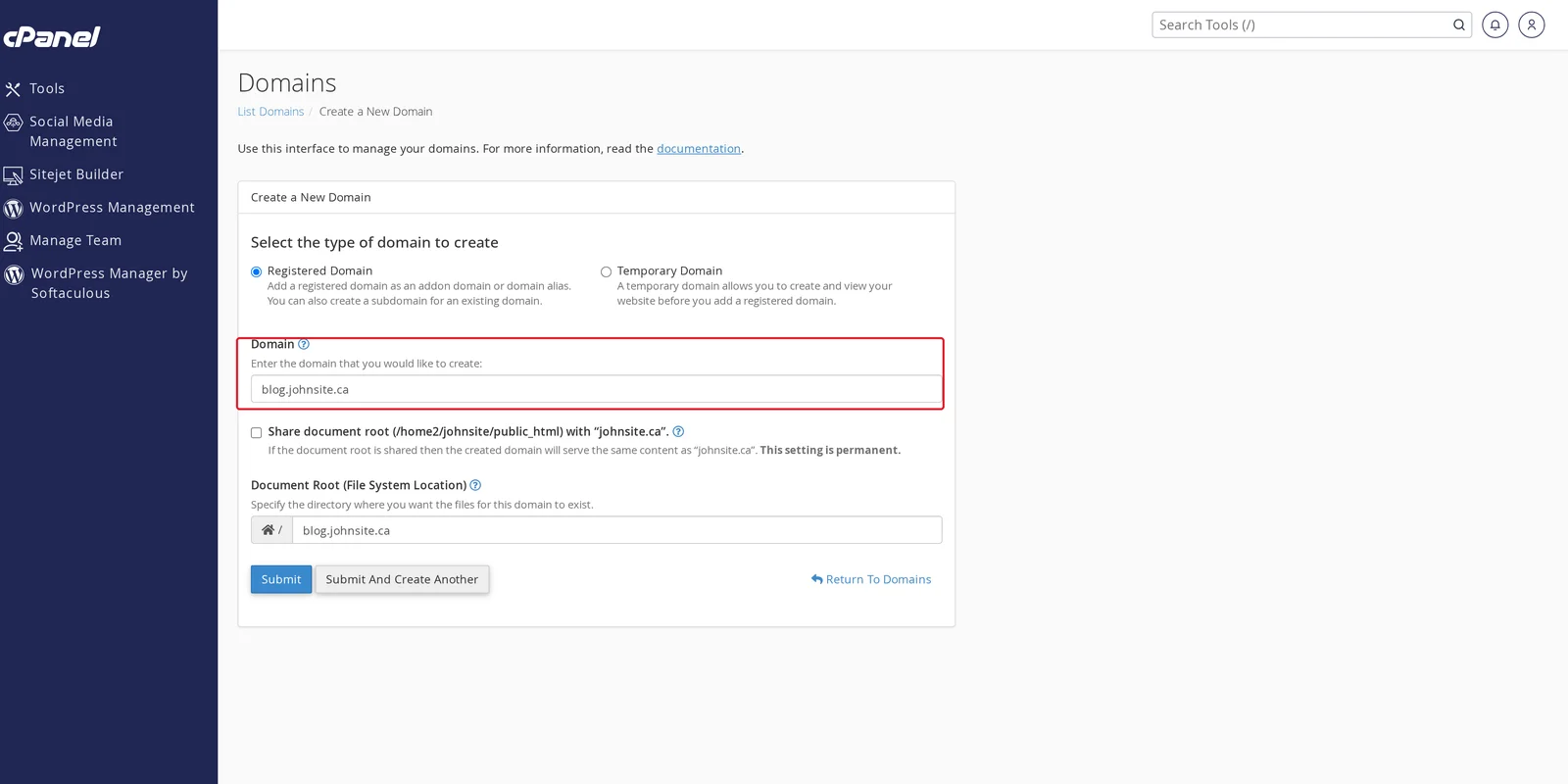
- Click Submit. Your subdomain is created and ready to use.
Add content to your subdomain
Anything you upload to the subdomain's folder is served at the subdomain's URL. For example, if your document root is public_html/blog/:
- Upload
index.htmlto that folder → visible atblog.yourdomain.com. - Upload an
images/folder → available atblog.yourdomain.com/images/.
You can use File Manager, FTP/SFTP, or SSH — whatever you prefer. See Set up FTP or SFTP with FileZilla.
Install WordPress (or anything else) on a subdomain
Subdomains are full-fledged hosting locations — you can install separate WordPress, SiteJet, or any other software on each. From cPanel:
- Click WordPress Manager by Softaculous (or Installatron, depending on server).
- Click Install.
- In the Choose Domain dropdown, select your subdomain.
- Continue with the install. Files land in your subdomain's document root, and the URL it points to is the subdomain.
See Install WordPress, Joomla, or other applications for the full walkthrough.
SSL on subdomains
SSL is automatic. Once your subdomain has been live for a few hours and DNS has propagated, cPanel's AutoSSL provisions a free SSL certificate covering the new subdomain. Both http:// and https:// work; we recommend forcing HTTPS by enabling the redirect in cPanel → SSL/TLS Status.
Deleting a subdomain
- cPanel → Domains.
- Find the subdomain in the list.
- Click Manage next to it → Remove Domain.
Note: deleting the subdomain removes the cPanel mapping but does not delete the files in its document root. Use File Manager to delete those separately if you want them gone.
Common gotchas
I created a subdomain but the URL doesn't load
Most likely DNS propagation. Wait 5-30 minutes and try again from a different network or a private window. If you're seeing the cPanel "Coming Soon" page, you need to upload an index.html (or index.php) to your subdomain's folder.
Can I create a subdomain on a different server?
Yes — point the subdomain's A record (or CNAME) to a different IP via your DNS settings. Useful for hosting a blog on a separate WordPress install, an app on a VPS, etc.
Subdomains and email
By default, you can create email addresses at the subdomain (e.g. [email protected]) just like at the main domain. cPanel handles MX records automatically. If you only want email at the main domain, just don't create accounts at the subdomain — it'll never be used.
Wildcard subdomains
To handle any subdomain (e.g. customer1.yourdomain.com, customer2.yourdomain.com, etc.) without creating each one individually, you can set up a wildcard subdomain by typing *.yourdomain.com as the domain in the Create A New Domain form. This is useful for SaaS apps that give each customer a unique URL. Wildcards have a few quirks (AutoSSL needs DNS validation rather than HTTP), so open a ticket if you'd like us to set that up.
Related articles
Need help with subdomains? Open a support ticket


