
Every domain is registered to a person or business — the registrant — and the registrant's contact details are stored in the domain's WHOIS record. These details are how registries (CIRA, Verisign, etc.) reach you about your domain and, legally, the WHOIS is what proves ownership. Keeping them current is important.
Why WHOIS info matters
- Loss of the domain. Most registries (CIRA especially) will suspend or revoke a domain with invalid WHOIS if ICANN or the registry sends a verification email and it bounces. Keeping the contact email valid is the single most important field.
- Proof of ownership in a dispute. If someone claims the domain is theirs, the WHOIS registrant is the baseline evidence of who actually owns it.
- Account recovery. If you lose access to your CanSpace login, a valid WHOIS record makes it possible for us to verify your identity and restore access.
- Registry/registrar correspondence. Renewal reminders, transfer approvals, policy notices — all of these go to the WHOIS email.
Update your WHOIS info
-
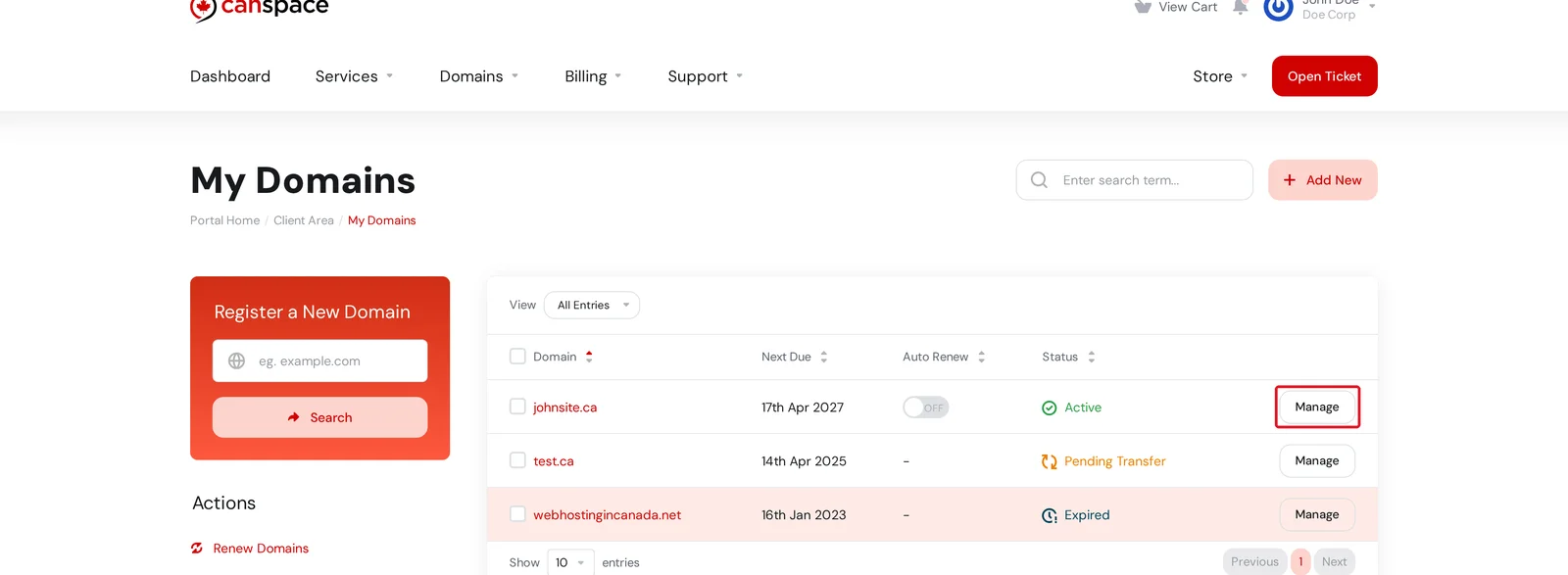
Log in to the client area and open Domains → My Domains. Click Manage on the domain you want to update.
-
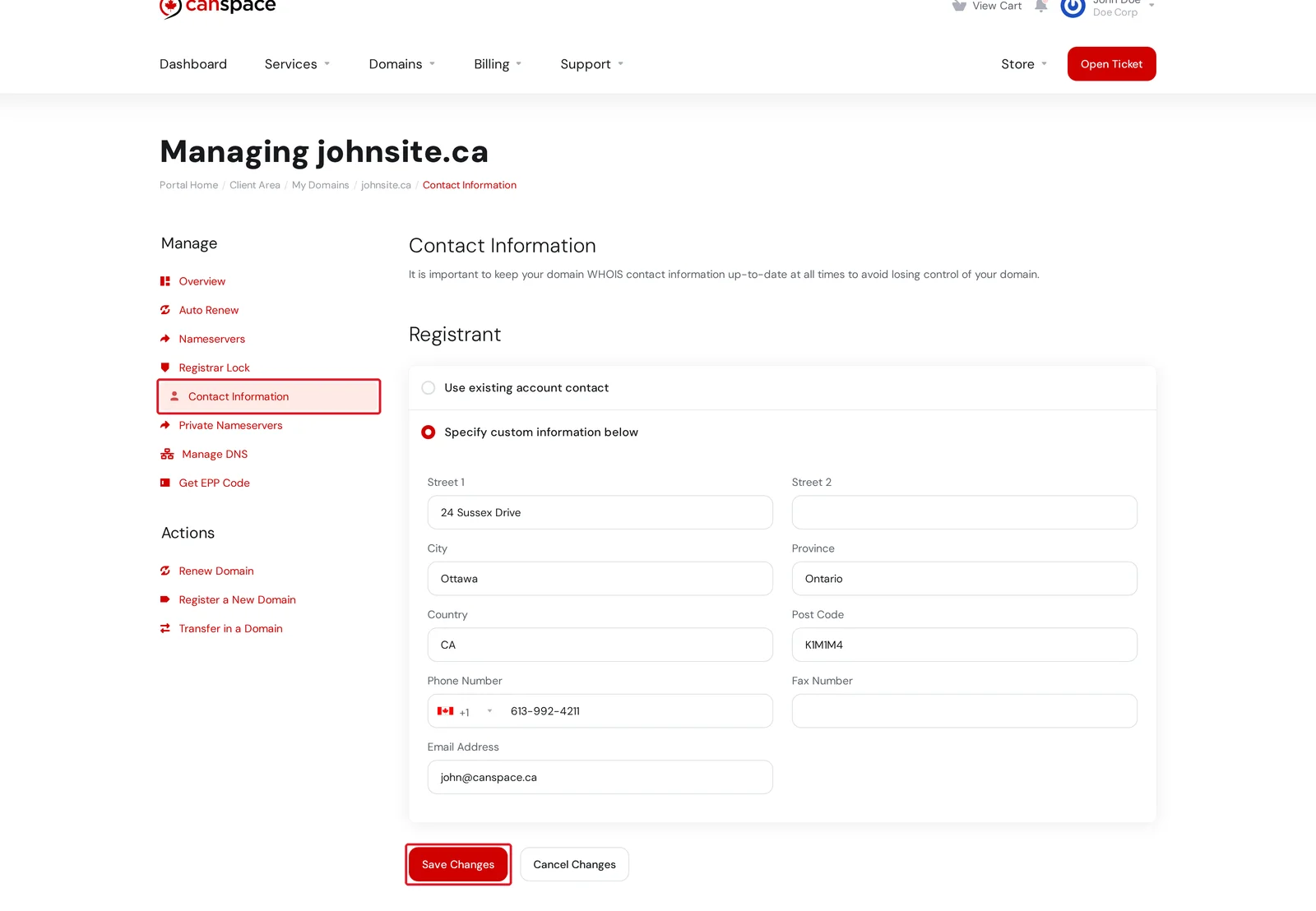
Open the Contact Information tab in the left sidebar. You'll see the current Registrant contact (and on most TLDs, separate Admin, Technical, and Billing contacts below it).
-
You have two options:
- Use existing account contact — copies the contact details from your CanSpace client profile. Use this if the domain's registrant is you and your client profile is up to date.
- Specify custom information below — manually enter a different address, phone number, or email. Use this if the domain is registered under a different name than your account (e.g. your business name rather than your personal name).
-
Edit the fields as needed and click Save Changes at the bottom. The new details are sent to the registry (CIRA for
.ca, the relevant registry for other TLDs) within a few minutes.
.com / .net / .org domains (governed by ICANN), changing the registrant's email triggers a verification email to the new address. You need to click the link in that email within 15 days to confirm the change — if you miss it, the domain can be suspended. .ca domains don't have this verification step.Updating multiple domains at once
If you need to push the same update to many domains (e.g. you moved offices and the address needs changing on 20 domains), use the bulk changes tool rather than editing each one by hand. See How do I make bulk changes?
I'd rather not have my personal info public
WHOIS is a public record by design — anyone can look up the registrant of a domain. If you'd rather keep your name, address, email, and phone number out of public view, turn on WHOIS privacy:
.cadomains include WHOIS privacy free of charge for Canadian individuals (required by CIRA); it's enabled by default when you register.- All other TLDs support WHOIS privacy as an add-on ($4.99/yr). When enabled, public WHOIS lookups show generic forwarding details instead of your real contact info, but the registry still knows who you are.
See How do I change WHOIS privacy options? for the toggle.
My changes didn't take effect
- Domain is locked. If Registrar Lock is on (which it should be, for security), some registries reject certain contact changes. Unlock briefly via the Registrar Lock tab, save your changes, then lock again.
- Registry rejected the change.
.cadomains can reject updates that change the registrant's legal type without a separate process. If you need to change the name of a.caregistrant (not just their address), open a support ticket — this requires a formal registrant transfer rather than a simple contact update. - WHOIS lookup still shows old info. Registry WHOIS caches can take a few hours to refresh. Wait a few hours and check again, or use whois.cira.ca (
.ca) or lookup.icann.org (other TLDs) for the authoritative current record.
Related articles
- How do I change WHOIS privacy options?
- How do I make bulk changes to multiple domains?
- How do I change my address, phone number, or other contact information?
Still stuck? Open a support ticket


